מדריך בלוקי שדות
סולמות דירוג
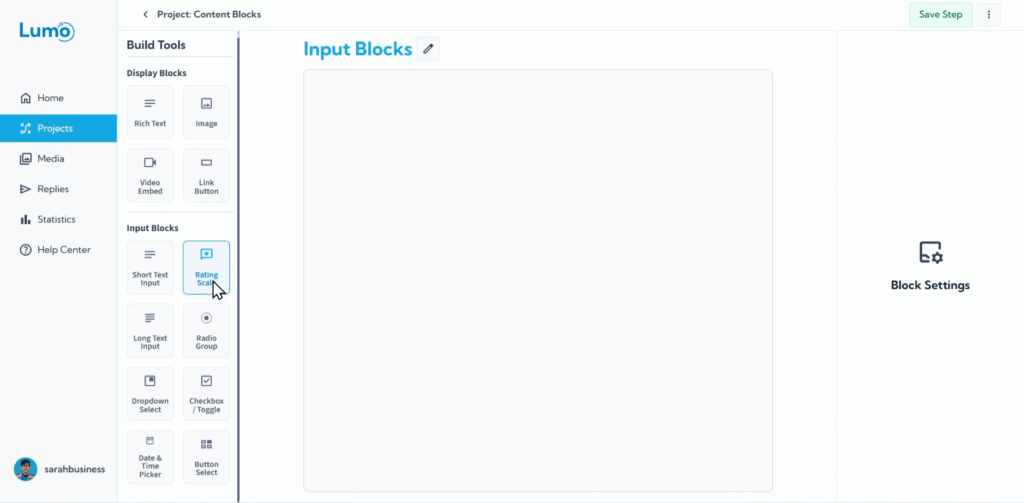
איסוף דעות ורמות שביעות רצון הוא קל עם בלוקי Rating Scale. שדות אינטראקטיביים אלה מאפשרים למשתמשים שלכם לספק במהירות משוב בסולם, מה שמקל עליכם לאסוף תובנות מדידות על מוצרים, שירותים או חוויות.
מדריך זה ילווה אתכם בהגדרת סולמות דירוג ב-Lumo שלכם.
מהו בלוק Rating Scale?
בלוק Rating Scale הוא בלוק שדות שמאפשר למשתמשים לבחור ערך מטווח מוגדר מראש, בדרך כלל מיוצג על ידי מספרים או אייקונים. זו דרך מהירה וויזואלית לאסוף ציוני שביעות רצון או רמות הסכמה.
שלב אחר שלב: הוספת שדה Rating Scale
הגדרת Rating Scale: לאחר שהבלוק Rating מופיע, תגדירו את המאפיינים המרכזיים שלו:
Rating Type: בחרו כיצד הסולם מוצג:
- Numbered: מציג מספרים (למשל 1, 2, 3, 4, 5).
- Icon: מציג סדרה של אייקונים לבחירה.
- Icon Choice: אם תבחרו "Icon", תבחרו אז את האייקון הספציפי (למשל Star, Heart).
Rating Range: הגדירו את הערכים המינימליים והמקסימליים לסולם שלכם. זה קובע כמה אפשרויות משתמשים יכולים לבחור.
- טווחים נפוצים הם 1-5, 1-7 או 1-10.
שמירת השינויים שלך
לאחר הגדרת סולם הדירוג, ודאו שאתם שומרים את השינויים שלכם באופן ידני על ידי לחיצה על כפתור "Save" בעורך.
אם תנסו לצאת מהעורך בלי לשמור, LumoPages תבקש מכם לשמור את העבודה שלכם. זה קריטי לשמירת כל הגדרות השדות שלכם.
סולמות דירוג מציעים דרך עוצמתית וכמותית לאסוף משוב, מה שמקל משמעותית על ניתוח נתונים. הם מספקים חוויה מהירה ואינטואיטיבית למשתמשים שלכם, מושלמת לאיסוף ציוני שביעות רצון או ביקורות מוצרים.