מדריך בלוקי שדות
סימון שדות כחובה
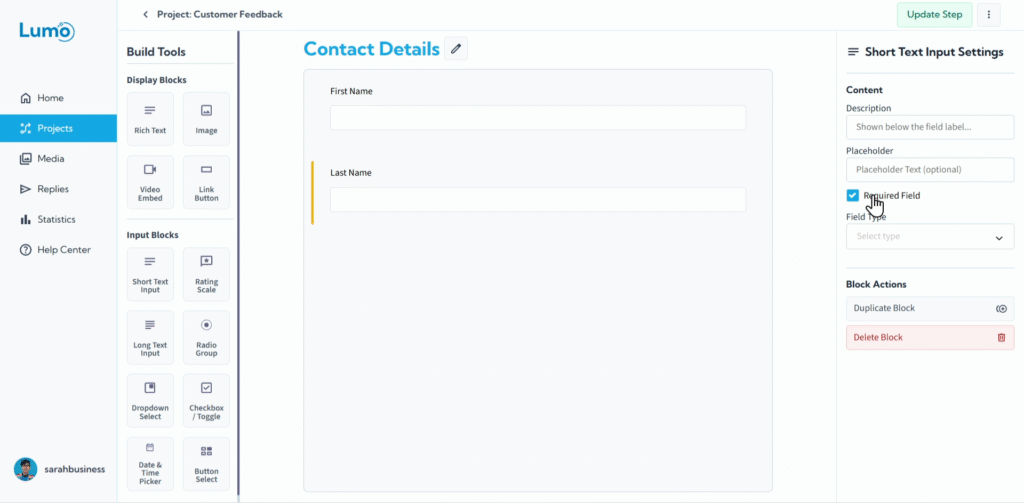
הבטחה שאתם אוספים את כל המידע הנחוץ מהמשתמשים שלכם היא קריטית לתפקוד הטפסים. הגדרת "Required" לבלוקי שדות היא תכונה פשוטה אך עוצמתית שמבטיחה ששדות ספציפיים חייבים להיות מלאים לפני שניתן לשלוח את הטופס.
מדריך זה מספק סקירה קצרה של כיצד לסמן שדות כחובה.
למה לסמן שדות כחובה?
- שלמות נתונים: מבטיח שמידע קריטי (כמו שמות, פרטי קשר או בחירות חובה) תמיד נאסף.
- הנחיית משתמשים: מציין בבירור למשתמשים אילו שדות חיוניים להשלמת הטופס.
- מניעת שליחות חלקיות: לא ניתן לשלוח את הטופס עד שכל השדות החובה מלאים, מה שמונע נתונים חלקיים.
כיצד לסמן שדה כחובה
התהליך לסימון שדה כחובה עקבי כמעט בכל בלוקי השדות ב-LumoPages.
איתור וסימון אפשרות "Required": בלוח ההגדרות של השדה, תמצאו תיבת סימון או מתג עם התווית "Required".
- לחצו על תיבת הסימון הזו כדי להפעיל סטטוס "Required" עבור אותו שדה.
משתמשים יכולים לראות אינדיקטור ויזואלי (כוכבית *) כשנבחר בעיצוב ה-Lumo, ליד שדות חובה בעת מילוי ה-Lumo. אם הם ינסו לשלוח את הטופס בלי למלא שדה חובה, הם יקבלו הודעת שגיאה שתבקש מהם להשלים אותו.
על ידי סימון אסטרטגי של שדות כחובה, תוכלו להבטיח את האיכות והשלמות של הנתונים שאתם אוספים, מה שהופך את ה-Lumos שלכם ליעילים עוד יותר לצרכים שלכם.