מדריך בלוקי תוכן
שדרוג ה-Lumo שלך עם תמונות ומדיה
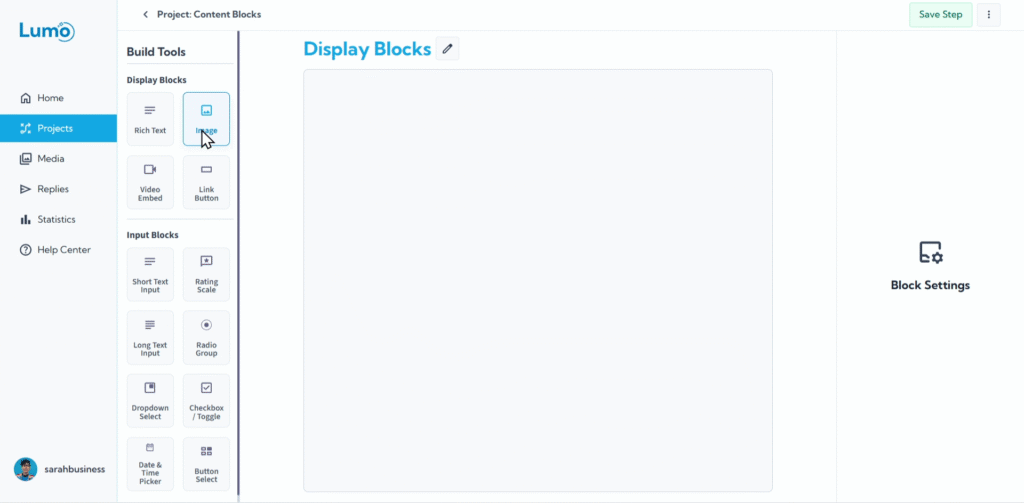
ברוכים הבאים למדריך בלוקי התוכן! ב-LumoPages, בלוקים הם אלמנטי הבניין הבסיסיים שמרכיבים את הטפסים הדיגיטליים שלכם. הם כמו הלבנים הבודדות שאתם משתמשים בהן לבניית ה-Lumo שלכם. יש שני סוגים עיקריים של בלוקים: בלוקי שדה (שנסקור במדריך הבא) ובלוקי תוכן.
מדריך זה מתמקד אך ורק בבלוקי תוכן. אלה האלמנטים שאתם משתמשים בהם להצגת מידע, לשיפור המראה החזותי של ה-Lumo, ולהנחיית המשתמשים. בניגוד לבלוקי שדה, בלוקי תוכן לא אוספים נתונים ישירות מהמשתמשים; במקום זאת, הם מעשירים את חוויית המשתמש על ידי מתן הקשר, ויזואליות ואלמנטים אינטראקטיביים.
חשבו על בלוקי תוכן כמרכיבי הסיפור של ה-Lumo שלכם. הם עוזרים לכם להגדיר את הסצנה, להציע הסברים, להציג מוצרים, או פשוט להוסיף את הטאץ' הייחודי של המותג שלכם.
לאורך מדריך זה, נדגים כיצד להשתמש ביעילות בכל בלוק תוכן, ונראה לכם כיצד להוסיף טקסט, תמונות, סרטונים וכפתורים אינטראקטיביים ל-Lumo שלכם.
בואו נצלול ונלמד כיצד להפוך את ה-Lumos שלכם לא רק פונקציונליים, אלא באמת מרתקים ויפים!