איסוף וניהול נתונים
חיפוש תגובות
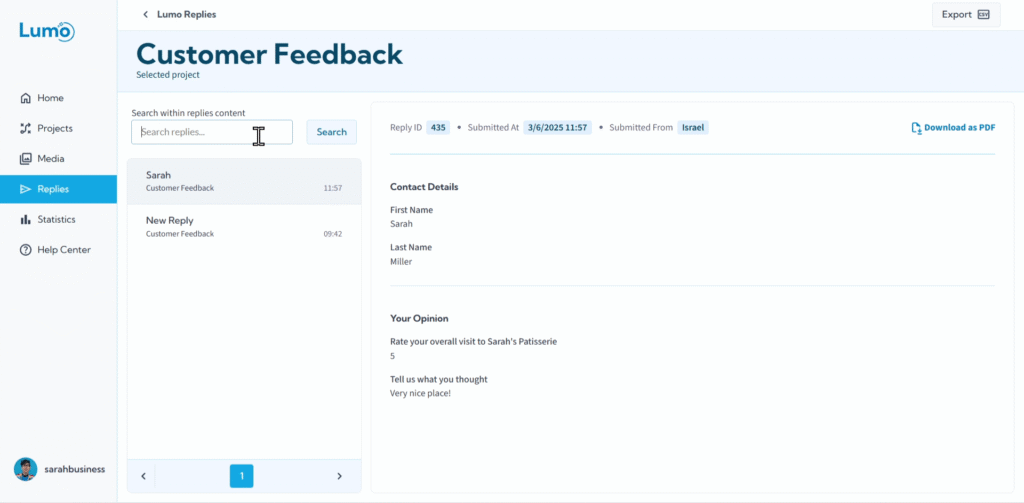
ככל שה-Lumos שלכם אוספים יותר ויותר נתונים, ה-Inbox שלכם יכול להתמלא במהירות. מציאת תגובות ספציפיות או ניתוח שליחות מטופס מסוים ביעילות הופכים לקריטיים. LumoPages מספקת כלי חיפוש חזקים בתוך ה-Inbox שלכם כדי לעזור לכם לנווט בנתונים שנאספו בקלות.
מדריך זה יראה לכם כיצד לסנן ולחפש את התגובות שלכם ביעילות.
למה לחפש בתגובות שלכם?
- יעילות: לאתר במהירות שליחות ספציפיות בלי לגלול ידנית דרך מאות או אלפי רשומות.
- ניתוח ממוקד: להתמקד בתגובות מ-Lumo מסוים, ולאפשר תובנות עמוקות יותר.
- חקירת נתונים: לגלות מגמות או נושאים נפוצים על ידי חיפוש מילות מפתח בתוך הערות או שדות טקסט.
- פתרון בעיות: למצוא מיד משוב רלוונטי אם לקוח מדווח על בעיה.
שלב אחר שלב: חיפוש תגובות לפי מילת מפתח
מעבר לסינון לפי פרויקט, אתם יכולים לבצע חיפוש טקסט מלא בתוכן התגובות כדי למצוא מילים או ביטויים ספציפיים.
- אתרו את שורת החיפוש: ב-Inbox שלכם, בדרך כלל ליד החלק העליון של הדף, תמצאו שורת חיפוש או שדה קלט שמתויג "Search within replies content".
- הזינו את מילת/מילות המפתח: הקלידו את המילה או הביטוי שאתם מחפשים בשורת החיפוש. פונקציית החיפוש בדרך כלל מחפשת התאמות בכל השדות של התגובות (למשל שדות טקסט, שדות טקסט ארוכים, הערות).
- צפו בתוצאות החיפוש: לאחר לחיצה על Enter, ה-Inbox יתעדכן דינמית כדי להציג רק את התגובות שמכילות את מילת/מילות המפתח שצוינו.
שמירת הנתונים שלכם
זכרו שחיפוש מיועד למטרות צפייה וניתוח בלבד; הוא לא משנה את התגובות השמורות עצמן. כל הנתונים המקוריים נשארים מאוחסנים בצורה מאובטחת בחשבון LumoPages שלכם.
כלים אלה הם בעלי ערך רב לחילוץ תובנות מהנתונים שנאספו. שימוש קבוע בסינון וחיפוש יעזור לכם לעקוב אחר משוב ספציפי, לנטר מגמות, ולהבטיח שאתם מפיקים את המרב מה-Lumos שלכם.
על ידי שליטה ביכולות הסינון והחיפוש בתוך ה-Inbox, אתם מקבלים שליטה חזקה על הנתונים שנאספו, ומאפשרים ניתוח מהיר יותר וקבלת החלטות מושכלת יותר לעסק שלכם.