איסוף וניהול נתונים
גישה וצפייה בתגובות (Inbox)
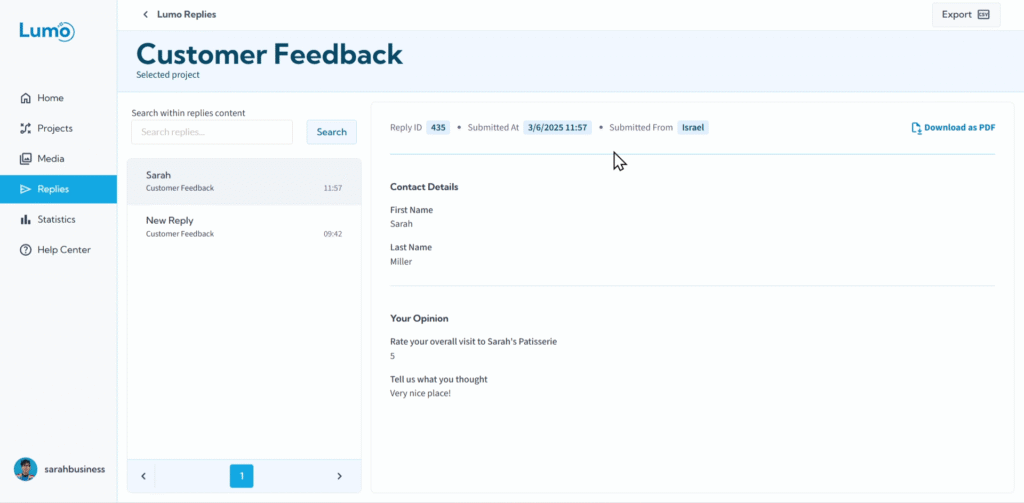
המטרה הסופית של יצירת Lumo היא לעיתים קרובות לאסוף נתונים ומשוב בעלי ערך. ברגע שהטופס הדיגיטלי שלכם פעיל, ההגשות מתחילות להגיע. LumoPages מספקת Inbox מרכזי וקל לניווט (המסומן "Submitted Forms") שבו תוכלו לגשת, לצפות ולנהל את כל התגובות שנאספו מה-Lumos שלכם.
מדריך זה ילווה אתכם בגישה ובצפייה בתגובות ב-Inbox שלכם.
מהו Inbox התגובות ("Submitted Forms")?
Inbox התגובות הוא המרכז הייעודי שלכם לכל הנתונים שהוגשו דרך ה-Lumos שלכם. בכל פעם שמשתמש משלים ושולח אחד מהטפסים הדיגיטליים שלכם, ההגשה (תגובה) נשמרת כאן באופן מאובטח. הוא משמש כרשומה מקיפה של כל האינטראקציות שאספתם.
שלב אחר שלב: גישה וצפייה בתגובות שלכם
צפייה בתגובה ספציפית בפירוט: כדי לראות את כל הפרטים של כל הגשה, פשוט לחצו על התגובה הבודדת ברשימה. פעולה זו תפתח תצוגה מפורטת של ההגשה הספציפית.
- בתצוגה מפורטת זו, תראו את כל הנתונים שנאספו מכל שדה ב-Lumo, מוצגים בצורה מסודרת.
סקירה יסודית של תגובות בודדות יכולה לעזור לכם לזהות מגמות, לטפל בחששות ספציפיים של לקוחות, או לקבל תובנות על חוויות אישיות.
מידע חשוב שנלכד עם כל הגשה
עבור כל תגובה שהתקבלה, LumoPages לוכדת ושומרת אוטומטית מטא-נתונים חשובים לצד תוכן הטופס:
- תאריך ושעת הגשה: חותמת הזמן המדויקת של מתי הטופס הושלם.
- מקור משוער: המיקום הגיאוגרפי המשוער שממנו הגיעה ההגשה.
שמירת הנתונים שלכם
כל התגובות שהוגשו מאוחסנות באופן מאובטח בחשבון LumoPages שלכם. אין צורך לשמור תגובות בודדות באופן ידני, שכן הן נרשמות אוטומטית עם ההגשה.
ה-Inbox שלכם הוא ארכיון חי של הנתונים שלכם. למרות שאינכם יכולים לערוך תגובות שהוגשו ישירות, תוכלו לצפות בהן בכל עת. אנו ממליצים לבדוק את ה-Inbox שלכם באופן קבוע כדי להישאר מעודכנים בהגשות חדשות ובתובנות.
Inbox התגובות הוא הכלי העוצמתי שלכם לניהול והבנה של הנתונים שזורמים מה-Lumos שלכם. זה המקום המרכזי שבו תוכלו לחלץ תובנות מעשיות מהטפסים הדיגיטליים שלכם. בהמשך, נחקור כיצד לסנן ולחפש בתגובות אלה כדי למצוא מידע ספציפי במהירות.