אזורים מותאמים אישית גלובליים
עמוד הצלחה מותאם אישית
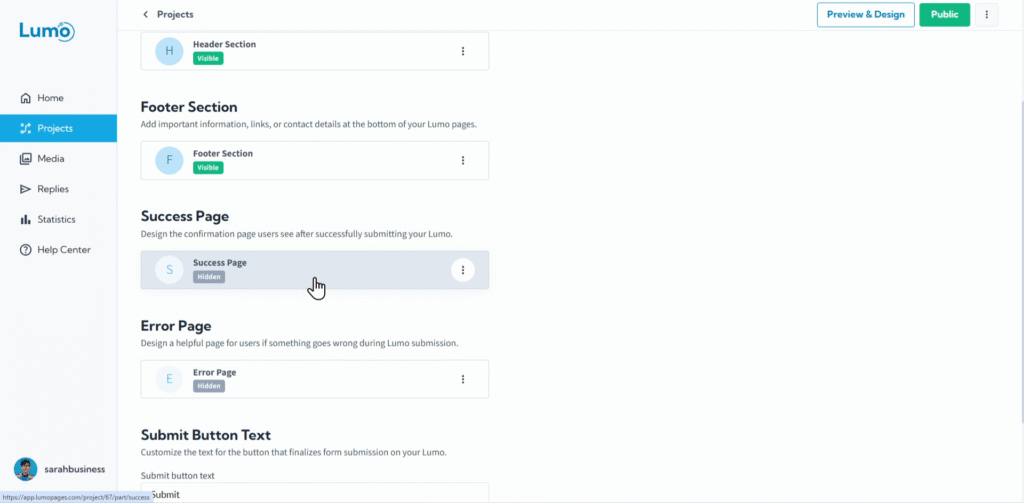
הרגע שבו משתמש שולח בהצלחה את ה-Lumo שלכם הוא נקודה קריטית במסע שלו. דף הצלחה מעוצב היטב מספק אישור מיידי, מחזק את המותג שלכם, ואף יכול להנחות משתמשים לאינטראקציה הבאה שלהם איתכם. הוא הופך שליחה פשוטה לחוויה חיובית ובלתי נשכחת.
מדריך זה ילווה אתכם בתהליך עיצוב דף הצלחה מותאם אישית ומשכנע עבור ה-Lumo שלכם.
מהו דף הצלחה?
דף הצלחה הוא הדף הדיגיטלי במסך מלא שהמשתמשים שלכם רואים מיד לאחר שהשלימו ושלחו בהצלחה את ה-Lumo שלכם. הוא משמש כ:
- אישור: מרגיע משתמשים שהשליחה שלהם עובדה.
- מיתוג: הזדמנות לשמור על הקול והזהות החזותית של המותג שלכם.
- מעורבות: הזדמנות להציע צעדים הבאים, כמו ביקור באתר או ברשתות החברתיות שלכם.
שלב אחר שלב: גישה ועיצוב דף ההצלחה שלכם
עצבו את הדף באמצעות בלוקי תוכן. כאן היצירתיות שלכם נכנסת לפעולה! דף ההצלחה נבנה אך ורק באמצעות בלוקי תוכן. זה אומר שאתם יכולים לשלב אלמנטים שונים כדי ליצור את ההודעה שלכם:
- Button: לספק צעדים ברורים הבאים למשתמש.
- Rich Text: להודעות תודה, טקסט אישור, או הוראות קצרות.
- Image: לכלול את הלוגו שלכם, גרפיקה חגיגית, או תמונה רלוונטית.
- Video: להטמיע סרטון תודה קצר או הצגת מוצר מהירה.
לא ניתן להוסיף בלוקי שדה לדף ההצלחה. דף זה מיועד להצגת מידע ולהנחיית משתמשים לאחר השליחה, לא לאיסוף קלט נוסף.
שמרו את השינויים: לאחר שעיצבתם את דף ההצלחה המותאם אישית, חשוב לשמור את השינויים באופן ידני. חפשו את כפתור "Save" בעורך ולחצו עליו.
דף ההצלחה שלכם הופך לפעיל ברגע שהוא נשמר. אם ה-Lumo שלכם כבר פעיל, שינויים שמורים בדף זה ישתקפו מיד למשתמשים לאחר שליחה מוצלחת. ודאו תמיד שאתם מרוצים מהעיצוב לפני השמירה.
על ידי השקעת מעט זמן בעיצוב דף הצלחה מותאם אישית, אתם יכולים לשפר משמעותית את חוויית המשתמש הכוללת של ה-Lumos שלכם, לחזק את המותג, ולהנחות ביעילות את המשתמשים לאינטראקציה הבאה שלהם איתכם.